Temporary Email Without Registration: The Ultimate Guide
The Quick Read
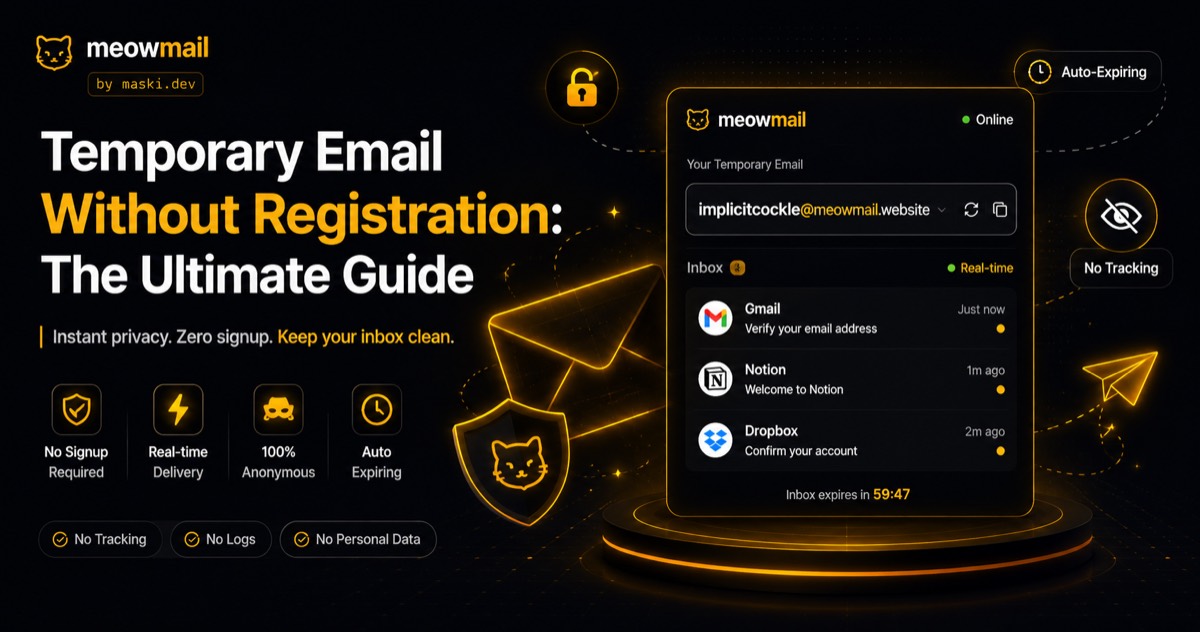
A temporary email without registration gives you an instant, fully functional inbox that requires zero personal data to create. These disposable addresses receive messages in real-time, bypass spam filters, and automatically expire. You get complete privacy and a clean primary inbox without ever handing over your real identity.
Key Takeaways
- Zero-signup inboxes protect your primary address from data breaches and relentless marketing spam.
- Real-time processing ensures you can complete account verifications instantly without waiting for delayed delivery.
- Strict no-tracking policies mean your digital footprint remains entirely disconnected from the disposable address.
- Custom inbox aliases let you organize temporary communications instead of relying on random character strings.
- Local browser storage allows you to return to an active session without creating a permanent account.
You click the download button for a software trial, and a mandatory form blocks your path. The site demands your email address before handing over the file. You know exactly what happens next if you type in your real address. Your inbox will flood with daily onboarding sequences, promotional offers, and eventual data broker sales. A temporary email without registration solves this exact standoff. You generate an instant inbox, grab the verification link, and download your file. The website gets a valid email address, and you keep your primary inbox completely clean. This simple exchange forms the backbone of modern internet privacy. You protect your personal data by refusing to hand it out in the first place.

What exactly is a temporary email without registration?
A temporary email without registration is a disposable inbox generated instantly on demand. You visit a website, receive a functional email address immediately, and read incoming messages right in your browser. No passwords, no security questions, and zero connection to your actual identity are ever required.
The mechanics of instant inbox generation
When you request a temporary email without registration, the underlying server executes a specific set of routing protocols. The system assigns a unique local part to one of its active domain names, instantly creating a valid destination for incoming traffic. Unlike traditional mail servers that build permanent database entries for every new user, this system holds the routing instructions in volatile memory. Incoming messages hit the server, match the active session in your browser, and display on your screen in real-time. The moment you close the session or the timer runs out, the server drops the routing rule completely. This ephemeral architecture ensures that the inbox only exists while you are actively looking at it.

Traditional email providers design their infrastructure around data retention and searchability. They want you to keep thousands of messages for years so they can serve targeted advertisements against that text. Disposable email services operate on the exact opposite principle. They treat incoming mail as a temporary payload that needs to be delivered and immediately discarded. By removing the storage requirement, these services eliminate the need for massive data centers and complex user authentication frameworks. You get the exact utility of an email address without any of the long-term baggage.
The auto-expiration lifecycle
Every disposable inbox operates on a strict time-to-live countdown. The service accepts mail for a specific window, usually ranging from ten minutes to a few hours, before the address stops functioning. Once the expiration triggers, the server rejects any new incoming messages and deletes the existing payload from its memory. This automated cleanup process requires no action on your part. You simply close the browser tab, and the digital paper trail vanishes entirely.
This lifecycle perfectly matches the reality of most online interactions. You rarely need a verification email to persist for more than five minutes. You just need to click the activation link and move on with your task. Auto-expiration turns a potential long-term privacy liability into a brief, controlled transaction. If a company suffers a data breach six months later, the email address they expose will bounce any spam attempts. The lifecycle ensures that your temporary address remains truly temporary.
The role of local browser storage
While the server handles the routing and expiration, your browser manages your specific session history. Modern privacy tools save your active inbox names locally on your device rather than on a remote server. This means you can accidentally close a tab, reopen it, and immediately regain access to your temporary inbox. The service recognizes your local session data without requiring a traditional login process.
This hybrid approach gives you the convenience of an account without the tracking implications. You control the local history entirely. If you clear your browser cache or use an incognito window, the session data disappears forever. The server never maintains a master list connecting your IP address to the inboxes you generated. You get the best of both worlds: persistent access during your current task and total anonymity once the task ends.
Why do you need a temporary email without registration right now?
You need a temporary email without registration to protect your primary inbox from spam, avoid data breaches, and test applications. These services act as a digital shield. They catch unwanted marketing messages and verification links so your real email address stays completely hidden from third-party databases.
Shielding against aggressive marketing newsletters
Companies treat your email address as a highly valuable asset. When you sign up for a single discount code or whitepaper, you often agree to dense terms of service that permit extensive marketing communication. You will start receiving daily newsletters, weekly product updates, and automated re-engagement campaigns. A disposable email for newsletters acts as a quarantine zone for this exact scenario. You get the initial discount code or download link, and the subsequent marketing barrage hits an expired inbox.
This strategy dramatically reduces the time you spend managing your primary inbox. You no longer have to hunt for tiny unsubscribe links or build complex filter rules. You simply stop the spam at the source. When you use a temporary email without registration, you force companies to respect your attention. They get one chance to deliver the value they promised, and they lose the ability to harass you afterward. Your primary email remains reserved for actual human communication.
Isolating risk during software testing
Software developers and quality assurance teams constantly need clean email addresses to verify system behavior. You cannot test a new user registration flow using the same personal email address fifty times. Creating dozens of permanent test accounts across major providers triggers automated anti-bot protections and requires phone number verification. A temporary inbox solves this testing bottleneck immediately. You can generate a new address for every test run, verify the routing logic, and confirm the email formatting in seconds.
This testing approach extends far beyond professional software development. Everyday users frequently need to test services before committing their personal data. You might want to see how a web application formats its reports or check if a service actually delivers what it promises. Generating a temporary inbox lets you poke around the inside of an application with zero risk. If the service turns out to be low quality or malicious, you simply walk away without leaving a usable contact method behind.
Preventing identity correlation in data breaches
Your primary email address functions as the master key to your digital identity. Data brokers and advertising networks use it to correlate your activity across entirely different websites. If you use the same address to buy shoes, register for a political forum, and sign up for a streaming service, data brokers link those distinct profiles together. When you use a temporary email without registration, you break this correlation chain completely. The shoe store gets one address, the forum gets another, and the streaming service gets a third.
The security implications become obvious during major database leaks. The website Have I Been Pwned tracks billions of compromised accounts, and the primary vector for credential stuffing attacks is a reused email address. When a low-security website gets hacked, attackers take the exposed email and try it against high-value targets like banks. If the low-security website only holds an expired temporary address, the attackers hit a dead end. You contain the blast radius of a data breach entirely.
How does zero-signup anonymity actually protect your data?
Zero-signup anonymity protects you by severing the link between your digital activity and your identity. Since you never provide a name, phone number, or backup email to create the inbox, data brokers cannot cross-reference the temporary address against your actual profile or track your behavior.
The danger of mandatory account creation
Major technology companies offer free email accounts, but they demand a high price in personal data. To open a standard permanent inbox today, you must provide your first and last name, your date of birth, and a verified mobile phone number. This setup process completely destroys any illusion of anonymity. The provider ties your new inbox directly to a device that tracks your physical location and billing information. Even if you use a fake name, the phone number verification firmly attaches the account to your real-world identity.
A zero-signup approach bypasses this surveillance entirely. You do not have to prove you are human by handing over a phone number. You do not have to establish a recovery path by linking a secondary email address. The service operates on the assumption that the inbox is disposable, so it requires no collateral to open it. This structural difference is the only way to achieve actual privacy. If a service requires identifying information to grant you access, it is not an anonymous service.
Strict no-logging policies in practice
True privacy requires a server environment that actively refuses to store user data. When a service operates with a strict no-logging policy, it configures its web servers to drop IP addresses and browser fingerprints immediately. The system only processes the data necessary to route the current email payload. Once the email displays on your screen, the server retains no record of the transaction. If law enforcement or a malicious actor compromises the server, they find empty routing tables instead of historical user logs.
You must look for services that make this technical architecture explicit. A vague promise to "respect your privacy" means nothing if the server still writes your IP address to an access log. MeowMail, for example, operates on a strict no-tracking foundation. The platform does not run third-party analytics scripts, does not plant tracking cookies, and does not store your inbox history on its servers. The privacy is enforced by the code itself, not just by a written policy.
Bypassing the hidden costs of permanent emails
Free permanent email providers monetize your attention and your data. They scan the contents of your inbox to build advertising profiles. They track which newsletters you open, which purchases you make, and which locations you visit. The Electronic Frontier Foundation continually highlights how these free services turn users into the actual product. You pay for the storage space by allowing the provider to monitor your private communications.
Temporary email flips this economic model. Because the infrastructure costs are incredibly low—requiring no long-term storage or complex account management—the service does not need to monetize your data to survive. The platform simply routes plain text and drops the connection. You avoid the hidden surveillance tax completely. You get the utility of an inbox without participating in the data brokerage economy.
What are the functional limitations of disposable inboxes?
Disposable inboxes cannot send outgoing mail and do not offer long-term storage. You cannot use them for critical accounts like banking or primary social media profiles. The domains eventually rotate, meaning password recovery becomes impossible once the temporary address expires or the hosting domain is retired.
The one-way nature of temporary communication
Almost all reputable temporary email services operate as receive-only platforms. You can read incoming verification codes and click activation links, but you cannot compose a new message or reply to the sender. This limitation exists for a very specific security reason. If a service allowed anonymous, untraceable users to send outgoing mail, spammers would immediately abuse the platform to launch phishing campaigns. The entire domain would get blacklisted by major providers within hours.
This receive-only constraint shapes how you must use the tool. You use it to catch incoming payloads, not to engage in two-way conversations. If you need to contact customer support or negotiate a contract, you must use a standard email provider. The temporary inbox serves purely as a defensive filter. It catches the automated junk so you do not have to.
The risks of using temp mail for permanent accounts
You should never use a temporary email without registration for an account that holds financial value or personal significance. If you register for a cryptocurrency exchange using a disposable address, you will eventually lose access to your funds. The moment you forget your password, the exchange will send a reset link to the email on file. Since your temporary inbox expired weeks ago, that reset link vanishes into the void. You have permanently locked yourself out of your own account.
You must clearly separate your digital life into disposable and permanent categories. Your bank, your primary social media profiles, your government portals, and your primary shopping accounts require a secure, permanent email address. You use temporary addresses for the disposable category. This includes one-time software trials, random forum registrations, Wi-Fi portal logins, and gated content downloads. You only use temp mail when losing access to the account carries zero consequences.
Domain blacklisting by aggressive services
Some websites actively try to block temporary email addresses. They maintain lists of known disposable domains and return an error message asking you to "Please enter a valid email address." These companies desperately want your real data, so they spend resources trying to force you into compliance. When a specific temporary domain becomes too popular, aggressive websites will flag it and refuse registration.
The best temporary email services counter this tactic by regularly rotating their domain names. They retire domains that have accumulated too many blocks and introduce fresh, unrecognized domains to the pool. Using a service that offers custom aliases can also help bypass these lazy filters. Instead of generating a highly suspicious address like x8f9q@, you can create newsletter-test@. This looks like a legitimate corporate address and often slips right past automated domain blacklisting tools.
How do you choose the right temporary email service?
You choose a service by verifying its privacy policy, checking its domain rotation frequency, and testing its real-time delivery speed. The best tools offer custom inbox names, run strictly in your browser, and explicitly state they do not log your session data or IP address.
Evaluating privacy and logging claims
You must read the privacy policy of any tool you use to handle your communications. Many services claim to be private on their homepage but admit to logging IP addresses and selling aggregated data in their terms of service. You need a platform that explicitly states a zero-logging policy. The service should explain exactly how it handles incoming payloads and when it drops the data. If the technical explanation is missing, the privacy claim is likely a marketing gimmick.
You should also check the page source for third-party trackers. A temporary email without registration cannot protect your privacy if the website itself runs Google Analytics or Facebook Pixel. These tracking scripts monitor your behavior and tie your visit back to your broader digital profile. A truly privacy-first tool runs a clean, minimal website without injecting surveillance capitalism into your browser.
Custom aliases versus random strings
Most basic temporary email providers force you to use a randomly generated string of characters. While this works for a quick copy-paste job, it becomes frustrating if you need to manually type the address into a different device. It also looks highly suspicious to website administrators monitoring their registration logs. A random string screams "bot activity" and invites manual account deletion.
Advanced platforms like MeowMail allow you to create custom temporary email aliases. You can type in a specific word or phrase, select an active domain, and generate a readable inbox name. This feature provides massive utility for temp mail for software testing. A QA engineer can create login-test-01@ and login-test-02@, keeping their test data organized and legible. Custom aliases bridge the gap between disposable privacy and actual usability.
Comparing top disposable email features
When you evaluate the landscape of temporary email providers, you notice distinct differences in how they handle user friction. The best tools remove every possible barrier between you and the inbox.
| Feature | Standard Temp Mail | Privacy-First Approach (MeowMail) |
|---|---|---|
| Inbox Generation | Requires clicking "Generate" | Instant upon page load |
| Data Logging | Often logs IP addresses for 24 hours | Strict zero-logging policy |
| Inbox Names | Random character strings only | Supports custom readable aliases |
| Session Memory | Lost immediately if tab closes | Saved locally in your browser |
| Delivery Speed | Often delayed by server batching | Real-time immediate delivery |
You should test the delivery speed yourself. Open a temporary inbox, send a message from your primary account, and watch how long it takes to arrive. If you have to manually refresh the page or wait several minutes, the service is using outdated batch processing. Modern tools push the incoming message to your browser the exact second it hits the server.
FAQ
Q: How long do temporary emails last? Temporary emails typically last anywhere from ten minutes to a few hours, depending on the specific service and your active browser session. Once the expiration window closes or you clear your local data, the server permanently deletes the routing rules and any received messages.
Q: Is a temporary email without registration truly anonymous? Yes, it is truly anonymous if you use a service with a strict no-logging policy. Because you never provide a name, phone number, or backup email to create the inbox, there is no personal data for the service or data brokers to tie back to your real identity.
Q: Can I send emails from a disposable address? No, reputable temporary email services operate as receive-only platforms. This strict limitation prevents spammers from using the anonymous infrastructure to launch phishing attacks, which would cause the service's domains to be permanently blacklisted across the internet.
Q: Why do some websites block temporary email addresses? Websites block temporary addresses because they want to collect and monetize your real contact information. They use automated lists to flag known disposable domains, which is why the best temporary email services constantly rotate their available domain names to bypass these filters.
You now know exactly how disposable inboxes protect your primary identity from spam and data brokers. Your next move is to identify the most annoying mandatory signup form currently blocking your workflow. Generate a custom temporary alias right now, bypass their data collection attempt, and keep your real email address entirely out of their database.
Try MeowMail free
Generate a private, disposable inbox in one click. No signup, no tracking.
Get a temporary inbox